| On This Page 1. What AI Proctoring Is (and What It Can and Cannot Do) 2. The Core Signals: Face Detection, Tab Switching, and Secondary Camera 3. How the AI Works: Detection, Flagging, and the Human Reviewer 4. How to Build It: The Implementation Approach 5. Cost, Timeline, and Total Cost of Ownership 6. Real Case Study: A Singapore Learning Platform 7. Best Practices: Privacy, Fairness, and the Human Reviewer 8. FAQs |
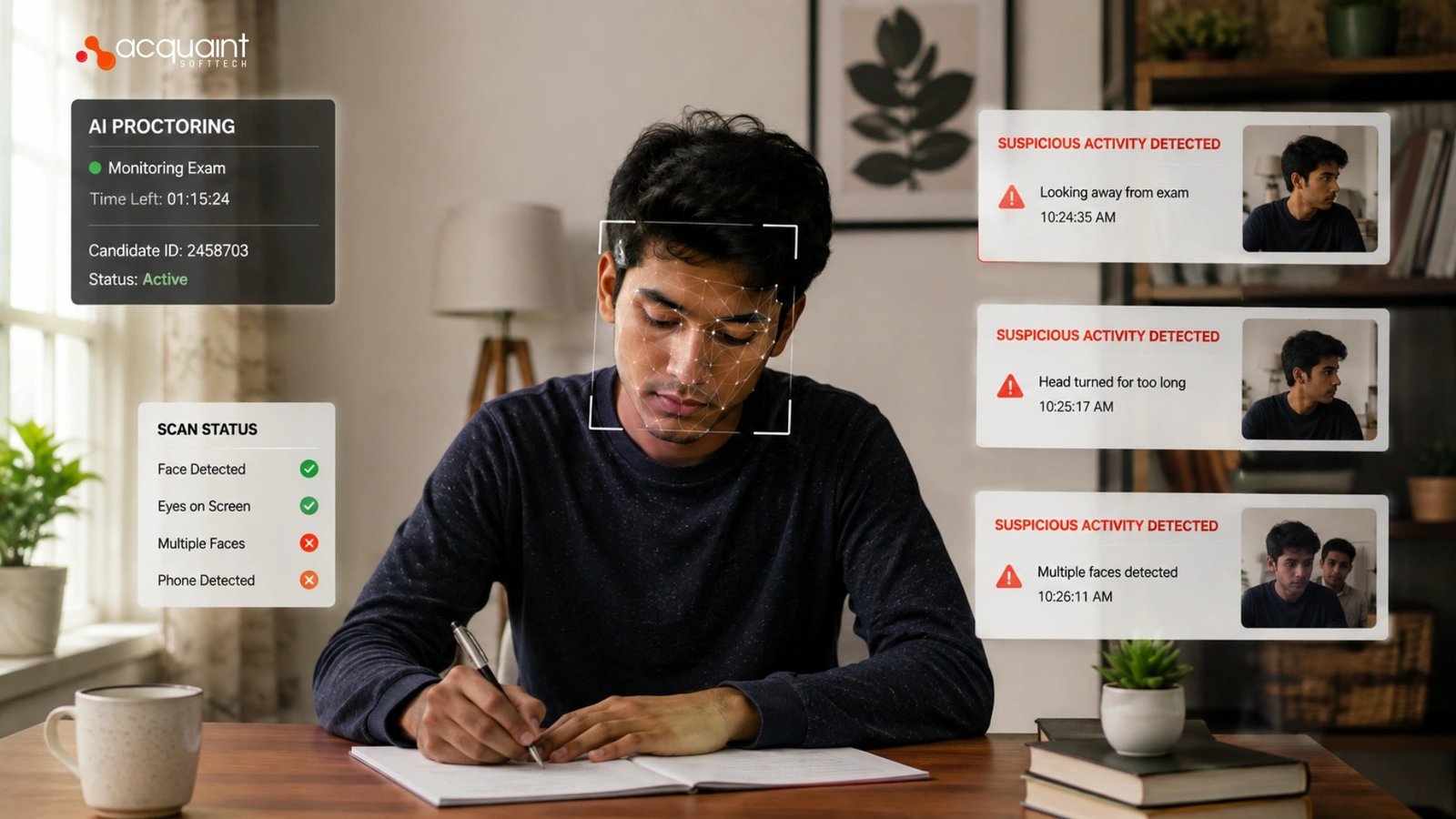
Planning to build an AI proctoring system for online exams? Our AI development services help EdTech teams build secure, fair, and scalable proctoring solutions. AI proctoring monitors signals such as face detection anomalies, tab switching, and secondary camera feeds to identify suspicious behavior, but accurate detection alone is not enough.
The real challenge is building a system that is fair, transparent, and reliable, which is why we design AI proctoring with human review as part of the decision-making process. If you are researching how to build an AI proctoring system with face detection, tab switching, and secondary camera monitoring, this guide explains the core signals, system architecture, implementation approach, and development costs.
Fairness is not an afterthought here, and the data proves why. The United States National Institute of Standards and Technology, through its Face Recognition Vendor Test, has evaluated nearly 200 face recognition algorithms and documented that accuracy varies across demographic groups, with higher false-positive rates for some.
That single finding is why a proctoring system must treat a face-detection alert as a signal for human review, never as an automatic verdict against a student. Build it any other way, and you build unfair outcomes into the product.
So we will work through it in order: what proctoring is and is not, the three core signals, how the AI flags and a human decides, how the build goes, what it costs, and a real platform we delivered. For the wider platform context, this article sits under our complete guide to EdTech software development.
What AI Proctoring Is (and What It Can and Cannot Do)
AI proctoring is a system that observes an online exam through the candidate’s camera, screen, and browser, and surfaces moments that may indicate cheating. It is not a lie detector, and it is not a judge: it produces signals and confidence scores, not verdicts.
Building it responsibly is a hire Python developers kind of job, because the detection logic, the models, and the data pipelines all sit in the Python and machine learning ecosystem.
What it can do
A good system can verify identity at the start, detect whether a face is present and whether more than one person appears, notice when the candidate leaves the screen or switches tabs, and capture a room view from a second camera.
These are useful deterrents and evidence, and most cheating is deterred simply because candidates know monitoring is active. Designing those capabilities as a coherent product is a software product engineering services discipline rather than a pile of disconnected scripts.
What it cannot do
It cannot read intent, and it cannot reliably distinguish a cheater from a nervous student who looks away to think. That is why every flag is a hypothesis for a human to confirm, not proof, and why the assessment record it feeds must be accurate and auditable. The same structured-data discipline behind that record is explained in our guide to how learning management systems work.
The Core Signals: Face Detection, Tab Switching, and Secondary Camera
Three signals do most of the work in proctoring: face detection from the primary camera, tab-switch and focus tracking from the browser, and a room view from a secondary camera. Each catches a different kind of risk, and together they paint a fuller picture than any one alone. Building all three to work in concert is core to dedicated software development teams work, because they span computer vision, browser events, and mobile streaming.
Face detection and tab switching
Face detection answers basic integrity questions: is a single candidate present, did a second face appear, and did the candidate leave the frame? Tab-switch and focus tracking use browser events to notice when the exam window loses focus, or another tab opens, which can signal a candidate searching for answers.
These browser-level features are exactly the kind of precise frontend and backend work our software product development team builds, with the limits of browser sandboxing understood up front.
Secondary camera monitoring
A secondary camera, usually the candidate’s phone placed to the side, gives a room view that a laptop webcam cannot, showing hands, desk, and surroundings. It raises the bar against notes and off-screen help, and it streams video that the system must handle reliably in real time. That real-time video infrastructure is the same challenge covered in our guide to building a virtual classroom platform.
| Signal | Catches | Source |
| Face detection | Absent or extra people | Primary webcam |
| Tab switching | Searching for answers | Browser events |
| Secondary camera | Notes and off-screen help | Phone room view |
How the AI Works: Detection, Flagging, and the Human Reviewer
The AI in proctoring follows a simple loop: detect events from the video and browser, score how unusual each event is, and surface the flagged moments for a human reviewer with timestamps and clips. The model never closes the loop on its own; a person always makes the final call. Building those detection models is work our AI and ML engineers do with fairness and explainability as first-class requirements.
From raw video to scored events
Computer vision models run on the video to detect faces, count people, estimate head pose and gaze direction, and spot when the candidate is absent, while browser hooks log focus changes.
Each detection becomes a timestamped event with a confidence score, not a conclusion, so reviewers see what happened and when. Deciding which signals are worth modeling at all is a discovery workshop question, because every extra signal adds cost, noise, and privacy weight.
The human reviewer closes the loop
Flagged moments go to a review dashboard where a proctor watches the clip, sees the signal, and decides, which keeps judgment with a person who understands context. This design, AI proposes, and a human disposes, is what makes the system defensible and fair. The same build-versus-buy reasoning behind that architecture appears in our comparison of product engineering services vs software development.
| Stage | What happens | Who acts |
| Detect | Vision and browser events | The models |
| Flag | Scored, timestamped moments | The system |
| Decide | Review the clip and rule | The human |
How to Build It: The Implementation Approach
Building proctoring follows a clear sequence, and the order keeps risk and cost under control. The path runs from identity verification and capture, to detection models, to the flag-and-review workflow, to secure storage, and finally to a phased rollout on low-stakes exams. Getting the foundation right is core software development outsourcing work that pays back in reliability when real exams run.
Capture, detect, review
Start with reliable capture and identity verification, then add detection models one signal at a time, validating each against real recordings before trusting it. Build the reviewer dashboard early, because the human workflow is the product, not a bolt-on, and it shapes everything upstream. Running the video pipeline and models reliably at exam scale is where these builds hire DevOps engineers to keep streaming and storage stable under load.
Store sensitive data carefully
Proctoring captures biometric and video data, so encryption, strict access control, clear retention limits, and an audit trail are requirements, not nice-to-haves. Treating that sensitive record with the same rigor as health data is the right instinct, and the parallels are drawn out in our guide to EHR vs EMR and which to build.
Cost, Timeline, and Total Cost of Ownership
Proctoring is a phased investment, and cost depends on how many signals you build and how much you process live. A focused first version- identity verification, face presence, and tab tracking with a review dashboard, is a multi-month engagement rather than a quick app. Teams scaling this often hire dedicated remote developers instead of carrying computer vision specialists full time.
What drives the cost
Three factors move the number: how many detection signals you build, whether monitoring is live or reviewed after the exam, and the scale of video storage and processing. A contained first build with a few solid signals and human review keeps cost and risk down, while attempting real-time analysis of every signal at once is how budgets overrun. India-based delivery brings the same quality in at up to 40 percent below Western agency rates.
Read Also: Selecting adaptive equipment for pediatric and adult rehabilitation
Count the ongoing cost too
Proctoring is never finished at launch, because models need retuning, video storage accrues cost, and review workflows evolve with each exam season. Budgeting for ongoing support and maintenance from the start turns that into a predictable line item rather than a surprise.
It also helps to know the engagement-cost trade-offs before you commit. We map them in our breakdown of Python development cost across fixed price, dedicated team, and staff augmentation.
Real Case Study: A Singapore Learning Platform
Acquaint Softtech built a custom online education platform for an e-learning company in Singapore, and while it was not a proctoring product, it proves the foundations proctoring depends on. The build handled real-time video through a Zoom integration and issued verified credentials on completion, the live-video and exam-integrity capabilities a proctoring layer extends. This is a real, publicly reviewed engagement, documented among our case studies, which keeps this grounded in delivered work rather than theory.
Why these foundations matter for proctoring
Proctoring is, at its core, reliable real-time video plus a trustworthy record of who did what, and this platform delivered both halves in a different shape. Handling live Zoom sessions proved the team can manage real-time video at scale, and issuing verified credentials proved it can protect the integrity of an outcome. A proctoring layer adds detection and review on top of exactly these foundations rather than replacing them.
How we built it
Our team delivered it on a Python, Django, and PostgreSQL stack, the same Python and machine learning foundation that proctoring models live in, covering database architecture, video integration, course configuration, and testing, which is the kind of build we run through our Django development company practice. The engagement has run since 2022 and remains ongoing, a clear signal the architecture held up in real use.
| Proctoring foundation | Generic site | What we delivered |
| Real-time video | None | Zoom integration |
| Outcome integrity | Weak | Verified credentials |
| ML-ready stack | Limited | Python and Django |
| Record foundation | Thin | Relational and clean |
Best Practices: Privacy, Fairness, and the Human Reviewer
Proctoring done badly harms students and exposes institutions, so the best practices here are about responsibility as much as accuracy. The biggest mistake is letting the AI decide outcomes, which bakes in the demographic accuracy gaps that NIST documented. The second is treating biometric video casually. Getting this right is a governance question as much as a technical one, which is why virtual CTO services belong in the room when these systems are designed.
Fairness, consent, and accessibility
Keep a human reviewer on every flag, because face detection accuracy varies across demographics and an automatic verdict turns that variance into unfair outcomes. Tell candidates clearly what is monitored and why, get informed consent, and offer accommodations so a disabled or neurodivergent student is not flagged for behavior unrelated to cheating. Minimize what you capture, because the less sensitive data you hold, the less risk you carry.
Start low-stakes, then maintain
Roll out on low-stakes quizzes first, measure false-flag rates across different groups, and tune before anything high-stakes depends on it. Keeping a proctoring system fair and secure as models and regulations change is ongoing work, which is why version upgrade services matter more than buyers expect.
Because the system handles biometric student data, vetting whoever builds it is essential too. That is a discipline we cover in our guide to offshore development due diligence.
FAQs
How does AI proctoring work in EdTech?
AI proctoring monitors exams through a webcam, screen activity, and browser behavior. It detects identity, tracks tab switching, and records suspicious events. Human reviewers check flagged incidents before making decisions.
What are the core signals in AI proctoring?
The main signals are face detection, browser focus tracking, and room monitoring. These help identify unauthorized assistance or suspicious behavior. Combining multiple signals improves accuracy and reliability.
What is the implementation approach for AI proctoring?
Start with identity verification and secure video capture. Add AI detection features gradually and validate them with real exam data. Build a reviewer dashboard and enforce strong data privacy controls.
Is AI proctoring fair and accurate?
AI proctoring can identify suspicious activity but is not fully reliable on its own. Accuracy may vary across different user groups. Human review is essential to ensure fairness and reduce false flags.
What are the best practices for building proctoring software?
Use AI to flag events, not make final decisions. Be transparent about monitoring and obtain user consent. Secure sensitive data and continuously monitor false-positive rates.
How much does it cost to build an AI proctoring system?
| Region | Cost |
| US | $40,000–$150,000+ |
| UK | £32,000–£120,000+ |
| Europe | €37,000–€140,000+ |